The workspace
A tour of the 8gent screen, top to bottom, and where to find the palette.
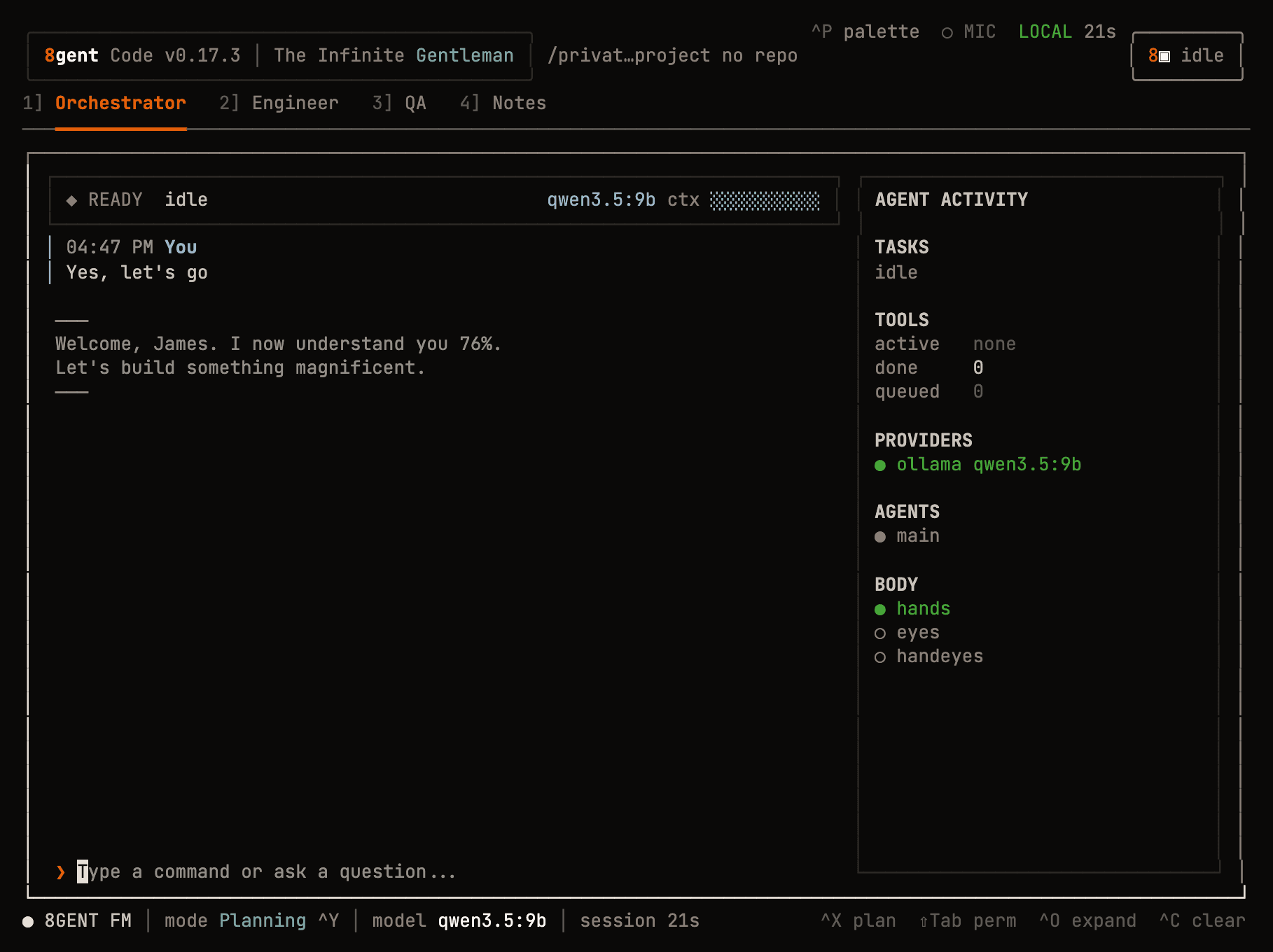
Top to bottom
Header. Version, the working directory and its git state. On the right: ^P palette, the microphone state, LOCAL when you are on a local model, and the living 8 with the agent's state (idle, working).
Tab bar. 1] Orchestrator 2] Engineer 3] QA 4] Notes out of the box. The numbers are the Ctrl+1 to Ctrl+9 shortcuts. A tab also shows its permission mode when it is not Ask, for example · Plan or ∞. See Tabs and agents.
Chat. A status strip (READY idle, the model, a context meter), the conversation, and the input at the bottom. Type a request or a / command. Dim ghost text may suggest the rest of what you are typing; Tab accepts it.
Agent activity (right). What the agent is doing now: tasks, tools (active, done, queued), providers and their state, running agents, and the body indicators (hands, eyes, handeyes) for computer use.
Footer. The DJ deck (8GENT FM), the task mode label (mode Planning ^Y), the model, session time, and key hints. When a tab is not in Ask, the footer shows perm Plan, perm Guarded or perm Infinite.
The palette
Ctrl+P opens the command palette: every slash command, searchable. Ctrl+P again closes it.
Views you can toggle
| Key | View |
|---|---|
Ctrl+X | Plan column: the living plan, next to the chat |
Ctrl+K | Kanban board of the current plan |
Ctrl+E | Predicted next steps |
Ctrl+B | Process panel: long-running commands and servers |
Ctrl+J | Background jobs |
Ctrl+O | Expanded view |
Ctrl+L | Message navigation: Up/Down to pick a message, Enter to open it, Esc to leave |
All keys: Keyboard shortcuts.
Task mode is a label
Ctrl+Y cycles the task mode shown in the footer: Planning, Researching, Implementing, Testing, Debugging. It tells you and the agent what phase you are in. It does not change what the agent may do. That is the permission mode, on Shift+Tab.
Quit
Ctrl+C saves the session and quits. Pick it up later with 8gent --resume. See Sessions.